Plotly Studio v0.0.89: Smarter File Handling, and Fewer Interruptions
New Features
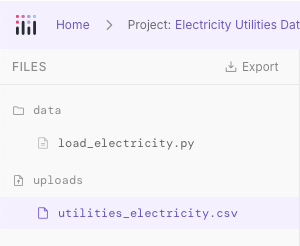
Uploaded files are now visible in the code browser. The code browser now includes an Uploads section, so you can see the files you've uploaded right alongside your project's generated code. The file list also stays up to date, reflecting any changes made through the project's artifact tools instead of showing outdated or duplicate entries.
Improvements
Clearer message when AI usage limits are reached. Instead of a cryptic error, you'll now see a plain "AI usage limit reached" message with a button that takes you directly to the billing page to add credits.
Security confirmation for saved secrets. An info icon next to saved secrets in Settings, session credential prompts, and the project credentials manager now explains that secrets are stored securely in your operating system's keyring and never sent back to the client.
Fewer unnecessary interruptions when fixing multiple issues. When you report several problems at once, such as multiple broken charts, the AI now fixes all of them without stopping to ask which to address first.
Better handling of large uploads. Uploading a zip file with large directories (like .venv or node_modules) no longer risks errors — common large folders are skipped automatically, and other folders are capped at 200 files.
Fixes
Fixed a rare issue where certain wording in the AI's response could cause garbled or incomplete output to appear in the UI.